


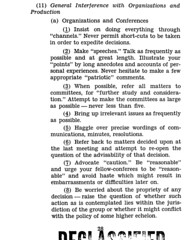
A declassied manual for spies on how to disrupt organisations sounds more like a description of the average office meeting.
links for 2008-09-17
-
Another device to improve sleep, this time by hitting the acupressure points on the inside of the wrist.
The Secret of Being Well-Read
By Jeremy Wagstaff
If you’ve been following this column closely, you’ll know I’m a huge fan of Really Simple Syndication, or RSS. I reckon it’s the single greatest thing to come out of the last few years on the Web. Well, that and Facebook. And Skype. And blogging. And disposable socks.
(For those of you not sure what I’m talking about, think of RSS like this: lots of interesting people, sending you news and thoughts in a way that suits you, not them. For more, dig around my site tenmov.es which explains how to get up to speed on RSS.)
The problem is that RSS has been too successful. Everyone now offers their data in RSS form—newspapers offer dozens of RSS feeds, as they’re called, diced according to topic (sports, cookery, foreign news, corruption and skullduggery in high places; whatever the main issues are).
They’re not alone. Government departments are doing it; every blog does it; you can subscribe, as it’s called, to feeds of people’s bookmarks, their Facebook updates, their Flickr photos. It’s great stuff—it makes it possible to stay on top of all sorts of things, from big international stuff to what your kid’s doing at school—but it creates its own chaos.
The tendency, for us end-users, is to add feeds when we come across them. Visit an interesting blog and you want to take the feed so you can stay on top of what that person is saying, or see the photographs they’re sharing. Which is good; much better to grab it before you forget.
But this quickly gets out of hand. Before long you’ve acquired dozens of feeds and you’re now drowning in information. You have no time in the day to read it and now it feels like you’ve traded one bulging in-tray for another.
If this is what’s happened to you, here’s how to fix RSS excess:
The first point I’d make is to make a clear distinction between your email in box and your RSS. Email is for action: other people sending you stuff that you need to act upon, or for you to create emails and send them to other people.
RSS, by contrast, is for reflection: A chance for you to grab a cup of coffee and “read yourself up to date.” And don’t be shy about including in this stuff that which is personal—your football team, say—as well as professional. RSS is flexible enough to deal with this (as should be your boss.)
OK, a check list:
-
A feed reader that lets you create folders (Google Reader, for example).
-
An easy way to add feeds that doesn’t eat into your day (once again, check out tenmov.es for the simplest way to do this.)
-
An idea of what feeds you want, or you have already.
Now you’re ready to go.
First off, create folders that describe your interests, professional and personal: football, art, productivity, currencies, geraniums, etc.
When you grab a new feed, make sure you put it into the appropriate folder. Don’t leave it lying around for other people to trip over, or so you never find it again.
Get into the habit of checking your RSS feeds on a regular basis. Don’t let them pile up.
When you start to feel you’re getting more feeds than you can possibly read, you need to move to the next stage: creating super folders.
Create a couple of folders called ‘want to read’ and ‘must read’ (or something similar; I’m not necessarily going to come round and check you’ve done this exactly as I say.)
Move the feeds that you really need to stay on top of into the second folder. In the first put the feeds that you’d hate to miss, but upon which your job doesn’t depend. (Google Reader lets you put a feed in more than one folder, so you can keep these feeds in their original folders as well.)
If you put an “+” in front of the folder’s name you’ll find it usually sits at the top of your folder list, which makes it easier to find: Mine’s called +brainfood. Go figure.
The rule of thumb here is that you should have had time to read all the feeds in those folders by the end of the day. There’s nothing more demoralizing than coming in to work and finding a bunch of feeds piling up from the previous day. (OK, I suppose more demoralizing is coming into work and finding your company has gone bankrupt, but it’s all relative.)
If you find your new super folders are still bursting at the seams, start weeding. One way to do this is to remove those feeds from these folders that you can’t manage until you reach a comfortable level.
What I do is create another folder called “brainfood+” which contains stuff I really, really must read. I move the vital stuff from “brainfood” into this new folder until I’ve reached that sweet spot where I can manage reading the folder without breaking a sweat.
(The advantage of this, apart from it qualifying me as Grade–A Nerd, is that you’ve still got a backup folder of stuff you’d like to read if you had time. The old folder becomes a sort of wish-list of stuff you should read, whereas the + folder becomes the stuff you really have to read if you want to keep your job/spouse/house. Follow?)
Now keep pruning as you go, since the balance is likely to shift. I avoid subscribing to feeds where lots of stuff is coming in: I really, really like bloggers and writers who just write when they need to—sometimes only once a month. The beauty of RSS is that I’ll catch that rare post of distinction without having to do anything—and it doesn’t clog up my folder needlessly.
I hope this helps a bit. I’d love to hear from you if you’ve got your own solutions for dealing with RSS excess.
Jeremy Wagstaff is a commentator on technology and appears regularly on the BBC World Service. He can be found online at jeremywagstaff.com or via email at jeremy@loose-wire.com.
How to Build a Custom Search Engine

Custom Search is a great way to build a search engine that searches only the sites you want. This is useful if you find you’re trawling those sites—blogs, government sites, news sites, etc—on a regular basis and would rather search them all in one go.
Setting it up is pretty easy.
Go to Google’s Custom Search Engine page.
Click on the blue button:

Enter a name, and a brief description:

Enter some keywords relevant to your beat and the language you’re working in:

Select the first option in the next list (Only sites I select) – unless you want to include the web in your search, with the sites you select in the next window given priority:

Start typing in (or pasting) the names of the websites you want to include. Include http:// s ; it won’t work without.

Select the free edition and click the terms of service. And then click Next:

Try a few test queries to see if you need to tweak. If you do, hit the browser’s back key and tweak:

When you’re happy, click Finish. (You can always add more sites later.)
You’ll then be sent to a page listing your search engine, and any others you choose to add. If you need to tweak, click on the control panel link; the homepage link will take you to the search box of the relevant engine.
Here’s a couple of custom search engines I’ve built as examples:
- Singapore blogs/websites not affiliated with government or companies
- Loose Wire search: a search of all the sites I maintain.
Tip(s)
It’s worth bookmarking this page, or even adding it to your iGoogle page if you have one.
- Some websites don’t submit themselves to Google well. For mission critical searches, compare the results of your engine with those of the site’s own search. Sometimes Google does a better job, but sometimes it doesn’t.
- Custom search works best a tool to use alongside RSS feeds. RSS is great for monitoring new stuff; custom search is great for looking up background or hunting other less time-sensitive stuff: names, projects, companies etc
links for 2008-09-15
-
GroupLens is a research lab in the Department of Computer Science and Engineering at the University of Minnesota. We conduct research in several areas
-
a browser that’s been doing all this stuff the others are starting to do a long time ago.
-
Great tool for converting a Wikipedia entry into a mind map that you can then export to Freemind. Useful for showing the uninitiated how mindmaps work, and how powerful they are. (thanks Roy of Topicscape for the link)
-
Your computer has been breached by malicious hackers: it’s completely loaded with malware and spyware. You’re about to get online, connect to a financial institution, and make some transactions. Is there anything, at this point, that can keep your identity off the black market? SiteTrust, a tool released today by Waltham, MA, data-security company Verdasys, aims to protect users from fraud, even when their computers have been compromised.